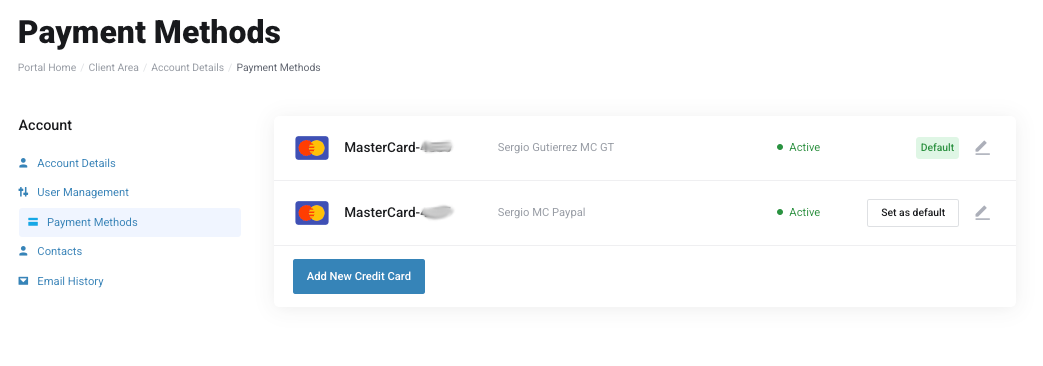
To manage your saved payment cards, follow these steps:
Navigate to the Billing menu on the left side of the Nubius Customer Portal.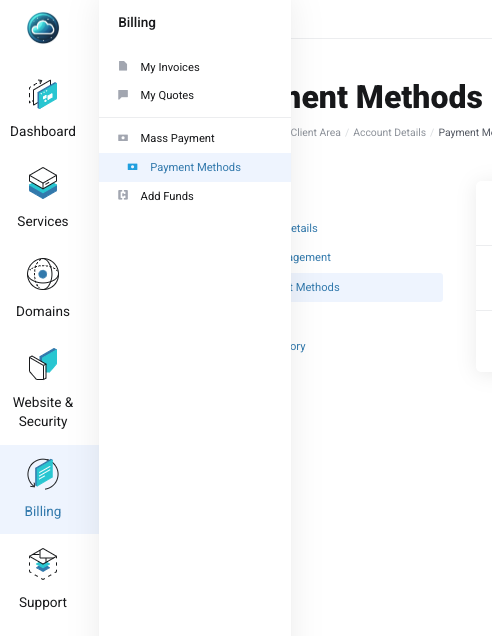
Click on Payment Methods to view all saved credit/debit cards.
Click on Add New Payment Method.
Enter your card details securely.
Select Save Payment Method to complete the process.
Note: We use Stripe as our primary payment processor and also support PayPal for card payments.
If you have multiple saved cards, you can choose which one to use as your default payment method:
Navigate to Payment Methods.
Select the card you want to set as default.
Click Set as Default.
If you need to remove an outdated or unused card, please reach out to billing@support.nubius.io
Nubius Solutions does not store credit card details in its system.
All card data is securely processed by Stripe or PayPal.
Our platform is PCI compliant, ensuring adherence to industry security standards.
For any issues managing your payment methods, contact Billing Support through the portal or email billing@support.nubius.io.